Harmos family · Available now
3D P–M–M
The failure envelope of a column, as a full 3D capacity surface — every ETABS combination verified directly.
The concept
A P–M–M interaction diagram is the failure envelope of an RC column — axial load against biaxial bending. Taking it from a 2D curve to a full 3D surface lets any load combination be verified directly, without approximation formulae.
Curve → surface
From a 2D curve to a full 3D capacity surface by rigorous section analysis.
Instant verification
Hundreds of ETABS design combinations verified at a glance — 360° around the axis.
Section-driven
Real geometry, rebar and grade; strain compatibility solved per axis depth.
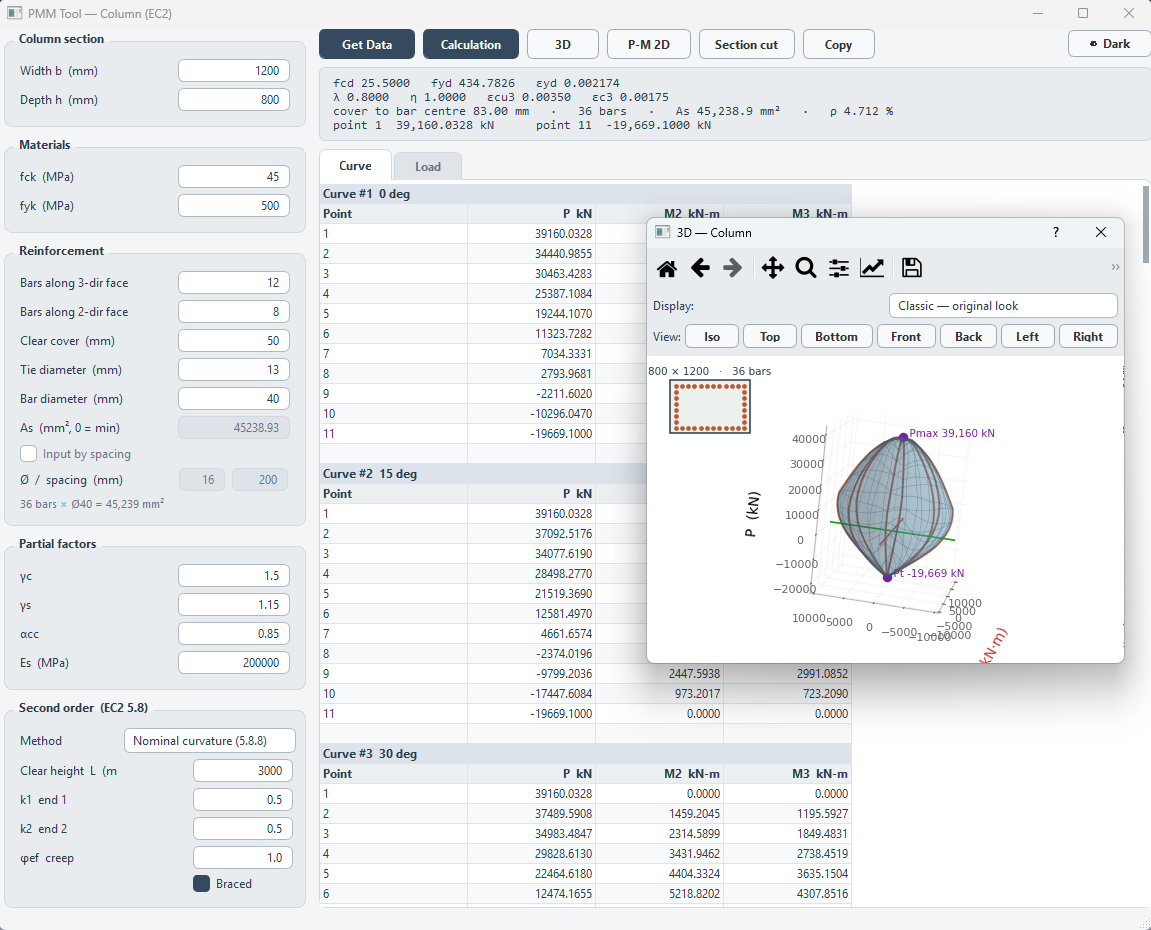
User Interface
The main window — same layout logic as the rest of the family.
Watch it work
The demo — exactly as presented in the sharing session.
Quick start
Three steps, same for every tool in the family.
-
Get your licence
Help → License → Request Access. Outlook opens a ready-made email — add your name and team, then send. After approval, enter that same email, press Activate License (once per machine), then Log In. One licence covers the family.
-
Prepare the ETABS model
Run both the analysis and the concrete design in ETABS before you start. If the tool doesn't detect ETABS, use Tools → Set as active instance for API in ETABS.
-
Follow the numbered buttons
The main window is designed to be followed top to bottom — buttons unlock in order. Watch the Main workflow video above for a full run.
Part of the Harmos family — see all tools.