Harmos family · Available now
Beam Design
The RC beam schedule, end to end: reinforcement, long-term deflection, shear–torsion–tension interaction, and a submission-ready output — straight from your ETABS model.
The concept
A combination of Python, VBA, API, AutoCAD, Revit and Excel that automates the RC beam schedule from ETABS end to end.
Extract
Geometry, forces and reinforcement demand auto-retrieved from ETABS; continuous beam runs arranged automatically.
Design
Rebar sizing and detailing calculated against every engineering condition — with built-in code checks on every run.
Deliver
A submission-ready schedule with no drafting protocol missed — Corenet X alignment on-going.
User Interface
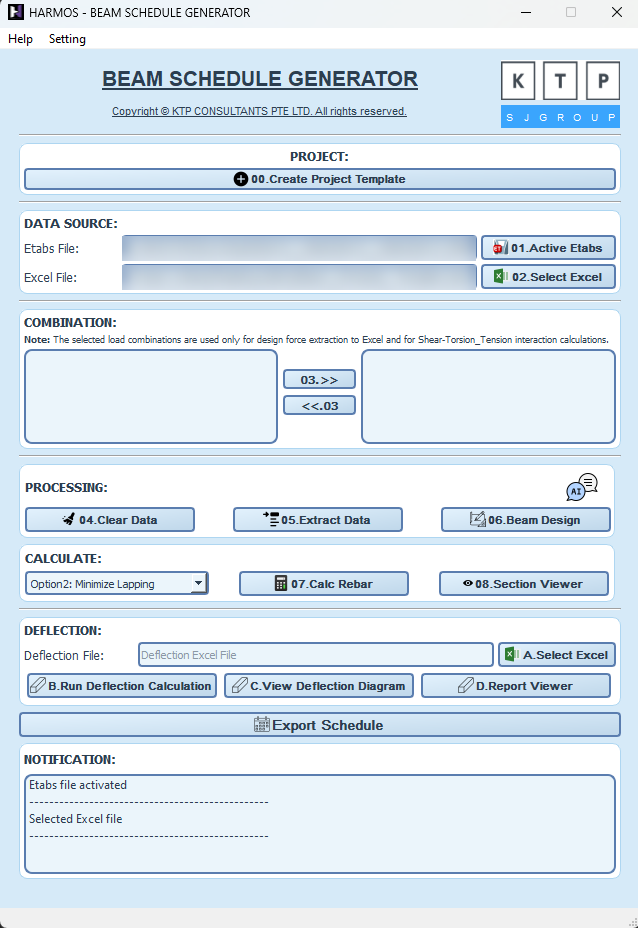
The main window — one screen, buttons 00 to 08.
Watch it work
The full run, then each highlight — exactly as presented in the sharing session.
Quick start
Three steps, same for every tool in the family.
-
Get your licence
Help → License → Request Access. Outlook opens a ready-made email — add your name and team, then send. After approval, enter that same email, press Activate License (once per machine), then Log In. One licence covers the family.
-
Prepare the ETABS model
Run both the analysis and the concrete design in ETABS before you start. If the tool doesn't detect ETABS, use Tools → Set as active instance for API in ETABS. Keep beam sections rectangular, and give all beams in one continuous run the same Beam Mark — that is how HARMOS joins beams that were split in the model.
-
Follow the numbered buttons
The main window is designed to be followed top to bottom — buttons unlock in order. Watch the Main workflow video above for a full run.
Full walkthrough — the interface, 00 to 08
PROJECT
Creates a new project Excel file.
DATA SOURCE
Connects to your open ETABS model, then picks the project Excel file.
COMBINATION
Choose which load combinations to design for and move them to the right box.
PROCESSING
Extracts the beam data out of ETABS and prepares it for beam design.
CALCULATE
Calculates the required reinforcement and lets you review each beam individually.
DEFLECTION
Runs the long-term deflection check, then opens the report or the deflection diagram.
EXPORT SCHEDULE
Produces the finished beam schedule.
Along the way: Help holds the user guide, technical notes, licence and feedback; Setting holds Pre-Setting, Pre-Setting Deflection and Theme; NOTIFICATION shows progress, warnings and errors while it runs.
Built-in code checks — every beam, every run
No check skipped because of a deadline:
Do & don't — two habits that prevent 90% of problems
Save the Excel file regularly.
Create a Version before you click 06 Beam Design.
Edit only the unlocked cells — formula cells are password-locked for a reason.
Hand-edit formula areas or insert new columns.
Rename the Deflection sheets (…_rN).
Edit the Excel file while HARMOS is writing to it.
Part of the Harmos family — see all tools.